This is where you find the changes that affect you as a Product Discovery application user. Here, we list changes to what you can do or see in the user interface, as well as new features. To see additions, changes, and fixes related to integrations and API , see the changelog in Product Discovery Developer docs.
Recently bought recommendations
2026-10-02
Recently bought is a new recommendation type that displays products the visitor has recently bought.
It helps your visitors easily return to products they've already purchased. It's typically used to promote consumables on category pages, landing pages, and My page. Supports in-store purchases from Customer Engagement.
Find pages that have never been published
2026-10-01
Pages that have been created but never published are now easier to spot and find in the page list. Here's how:
A new Published filter
Under State in the page list filters you'll find a new Published filter. Use it to show only published pages, or flip it to show only the pages that have never been published, for example, to clean up drafts or find the ones still waiting to go live.
A clearer marker in the list
Pages that have never been published now show an unpublished icon next to their title, so you can tell them apart from pages with pending changes at a glance. Since a page that has never been published can't receive traffic, the unused marker is now only shown on published pages.
Multi-select, then act: bulk actions on page product lists
2026-09-29
Curating a page product list used to mean handling one product at a time: pin one, block one, drag one. With the new multi-select functionality, you can select first and act on the whole selection at once.
Select multiple products
Click a product card in the primary product list to select it, then keep clicking to add more. A toolbar appears above the list showing how many products are selected, with Clear to start over.
Pin or block them all at once
With products selected, use the toolbar to Pin, Unpin, Block, or Unblock everything in the selection in a single click. Each button shows how many of the selected products it applies to, so you always know what will happen before you click.
Drag several pinned products together
Pinned products can already be reordered by dragging. Now, if you start dragging a pinned product that is part of your selection, all selected pinned products move with it. The drag preview shows how many products you are moving, and they land together in the new position.
Read more about Multi-select in product lists
A new Recommendations report
2026-09-25
The Recommendations report has been rebuilt from the ground up to help you understand not just how much your recommendations are used, but what they are worth.
- The new date selector lets you look at a day, a week, a month, a quarter, or a whole year.
- Turn on previous period and every metric is shown side by side with the period before it, so you can see at a glance whether things are moving in the right direction.
- Filter the report by one or several markets, by touchpoint, and by the algorithm behind the recommendations. Combine them to answer questions like "how do Alternatives perform on the product page in Sweden compared to Germany?"
- Alongside clicks, add-to-carts, and purchases, the report now shows revenue and profit driven by recommendations, with trends over time so you can spot changes as they happen rather than after the fact.
- Switch to the table view to go as deep as you need. Break the numbers down by market, touchpoint, and algorithm, and drill all the way down to the individual recommendation ID to see exactly which recommendations are pulling their weight.
Read more about the recommendation report
Starting with a new look
2026-09-24
The first thing you'll notice is that the app looks different. Cleaner surfaces, clearer type, and a bit more room to breathe.
Behind that, we've moved the app from Material Design 2 to Material Design 3, Google's latest design system. Nothing has moved and nothing works differently, so you'll find the same features exactly where you left them.
What's really changed is the groundwork. With the new design system in place, we can improve the interface faster and more consistently from here, so this refresh is the first visible step rather than the whole story. More is on the way.
A clearer integration dashboard
2026-09-21
The integration dashboard no longer lists the status of individual servers. In their place are summary cards for Request errors, Health, and Imports. Each card links straight through to its own full view.
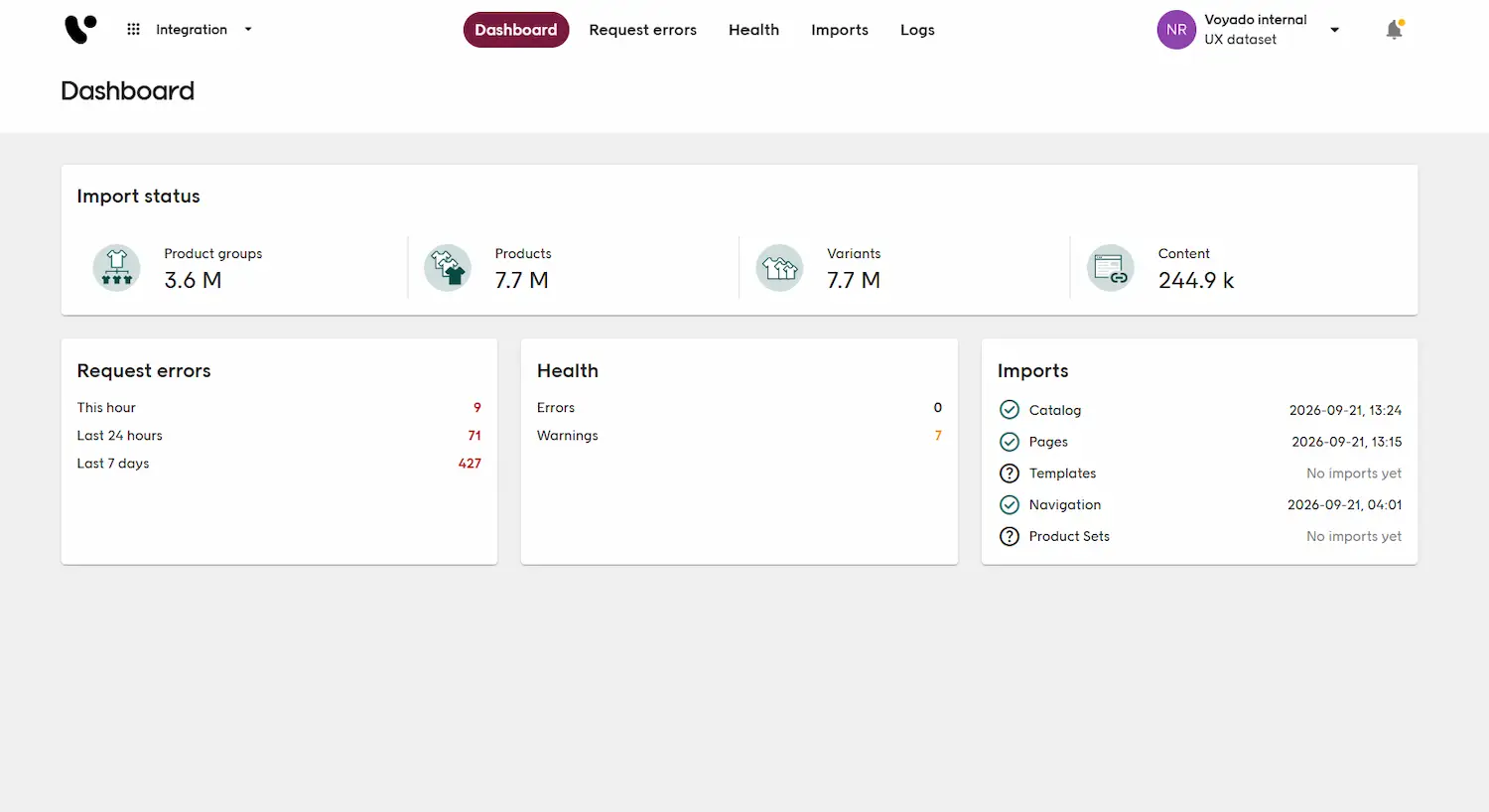
As we move to autoscaling, servers come and go automatically, so the status of any individual server no longer says much about how the integration is actually performing. These three views give a far better picture of that, and are now just one click away.
Search Explorer
2026-08-31
Every search result is the outcome of decisions you never normally get to see. Search Explorer lets you understand why a product appears where it does: how Product Discovery reads a phrase, which products it returns, and what puts each one in its position.
The new view is available now under Experience > Search tools > Search Explorer.
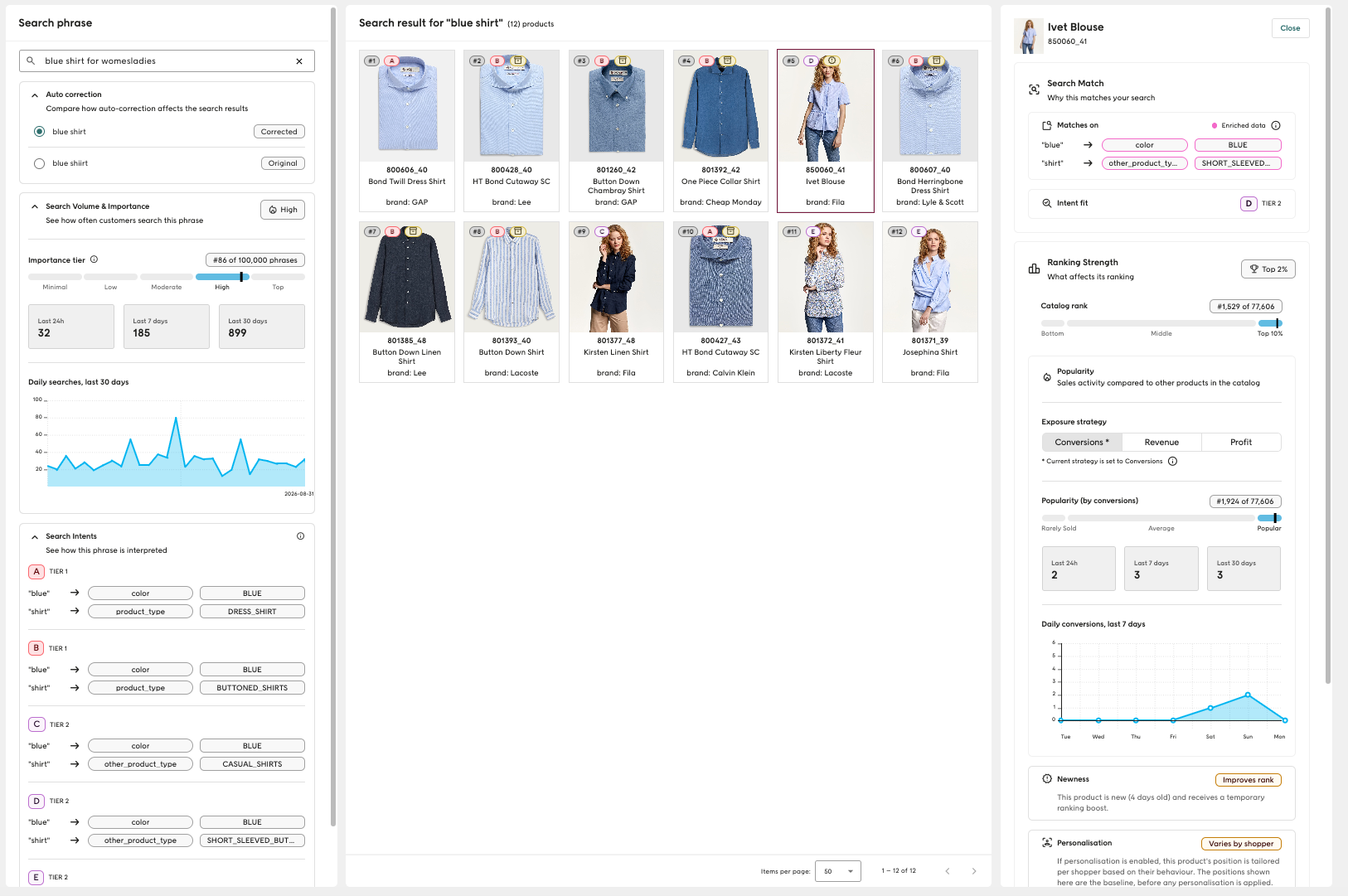
Helps you understand search "under the hood"
- Shows every way a search phrase can be interpreted, and which products matched on which interpretation
- Breaks down a product's ranking, from its intent match to the sales, boosts, and other components shaping its position
- Shows how often a phrase is searched, so you know how many customers a result actually affects
- Lets you explore "why is this product here?" instead of just guessing
- Helps you focus your effort on the results that actually affect the most customers
- Makes it easy to confirm a boost, bury, or synonym is behind a result you weren't expecting
- Shows which matches came as a result of Product Discovery's automatic data enrichment and helps you understand underlying classifications
Learn more
- Search Explorer
- Search Explorer FAQ
Add to cart metric for Boost & Bury
2026-08-20
We've added a new add to cart metric to Boost & Bury. This metric shows how your boosts and buries influence the number of products added to cart, so you can better understand their impact beyond clicks and purchases.
- The add to cart metric is now available on all new boosts and buries.
- Existing boosts and buries created before this release will not include the add to cart metric. Existing boosts and buries need to be recreated to show the addToCart metric.
Improved user permission flexibility
2026-06-08
User permissions are now more flexible in Admin → User Management. Instead of granting full edit access whenever a user needs to view a feature, admins can now choose read-only access for individual permissions.
This makes it easier to give users the access they need, without handing out more editing rights than intended.
Additionally, it is now also possible to set permissions with greater granularity than before, allowing admins more precise control over app users.
Anonymous traffic
2026-06-03
The Dashboard now reports anonymous traffic separately. Each section includes anonymous metrics alongside new and returning visitors. Sessions and conversions for anonymous traffic are shown as estimates, since they're derived rather than counted directly.
This is possible thanks to a new integration capability. Previously, when a visitor chose not to be tracked, the recommended way to implement that was to randomize their keys, which left this traffic difficult to identify. Retailers can now instead omit the keys entirely for those visitors, which lets Product Discovery recognize that the traffic genuinely comes from visitors who don't wish to be tracked, and report on it separately.
On top of being clearer, omitting keys is a much more stable and reliable way of handling anonymous traffic than randomizing keys.
Seeing anonymous traffic on the Dashboard therefore requires an integration change to adopt the omit keys model. You can read more about it, what anonymous sessions are, and how to integrate in our integration documentation.
More positions per product set in positioned slices
2026-06-02
Previously, each product set could only be assigned to up to five positions. You can now assign up to 50 positions per product set, giving you much more control over where products appear in the list.
A few limits still apply
- You can use up to five product sets per page.
- The combined number of positioned products across all product sets can never exceed 50 per page.
- Each selected position is filled by the most relevant product from that product set.
Smarter autocomplete for narrow searches
2026-05-28
What is it?
Autocomplete now adapts to the size of the search space (the number of products that match the search query to be expanded). When a query matches only a small number of products, Product Discovery no longer generates additional expansions, because suggesting variations of a term that leads nowhere isn't helpful to the shopper.
Why do I need it?
The result is a cleaner, more honest autocomplete experience. Shoppers see fewer but more meaningful suggestions, reducing dead-end searches and keeping them on the path to products that actually exist in your catalog.
Boost by tag
2026-05-28
What is it?
Boost by tag lets you apply predefined boosts to landing pages and category pages by passing a campaign tag with the page request.
For example, if a visitor lands on a category page from a URL containing utm_campaign=tiktok_summer, the site integration can read the value of utm_campaign and pass tiktok_summer in campaignTag as part of LandingPageParams. If a boost with the same tag name exists, Product Discovery applies that boost to the product listing.
This requires an integration update. Product Discovery does not automatically read URL parameters from the browser. The site integration must extract the relevant query parameter value and pass it in campaignTag on landing page and category page requests.
Why do I need it?
You can now tailor landing page and category page product listings based on campaign traffic, audience segments, A/B tests, or other external context. This makes it easier to align merchandising with marketing campaigns and customer segments without creating separate pages or hardcoded ranking logic for each scenario.
Pages open in view mode by default
2026-05-21
What is it?
Pages in Experience → Pages now open in a read-only view by default. This means you can always open and view a page, even if someone else is editing it. When you need to make changes, click Start edit at the top of the page to go into edit mode.
Why do I need it?
You can now open and review pages without interrupting colleagues who are already making changes, making collaboration smoother across teams. This update will prevent accidental edit conflicts and "Cluster Unavailable" errors when you are just viewing a page.
New Personalization report
2026-04-13
What is it?
The Personalization Report shows how personalization is used across your site and highlights the performance metrics driven by personalized ranking in both Search and Navigation.
Why do I need it?
You get a clear view of how personalization contributes to your business by tracking its impact on clicks, add-to-carts, and purchases. With funnel metrics for both Search and Navigation, you can analyze the full customer journey and identify where personalization performs best. Built-in recommendations also help you interpret the data and set the right expectations for what personalization is designed to achieve.
Schedule pending page changes
2026-04-09
Scheduled Changes lets you prepare updates to any page and set an exact hour for them to go live, without having to be available when they publish. Whether you're planning a campaign launch, a seasonal refresh, or a product highlight, you can set it up in advance and trust that it will go live exactly when you need it to.
Any change you can make to a page can be scheduled: merchandising rules, pins, slice configurations, and page settings. Once a scheduled change is saved, it remains in a pending state until the set time, and you can review, edit, or cancel it at any point before it publishes.
Integration imports overview
2026-04-08
The new Imports view gives integrators a structured overview of catalog imports into Product Discovery. No more digging through logs. Import rates, statuses, and failure details are now available in one place.
The new view is available now under Integration > Imports.
In-session personalization for Category and Landing pages
2026-03-30
We've introduced in-session personalization for category and landing pages, allowing you to tailor product listings in real time based on each shopper's behavior.
You can make listings more relevant using existing data, with no additional setup. Rankings adapt dynamically, helping shoppers find what they're looking for faster and leading to earlier clicks, more direct navigation, and improved conversion.
Positioned slices
2026-03-26
Positioned slices let you assign up to five products from a product set to specific positions in the list (for example, positions 1, 3, and 5). Each position is filled by the most relevant product from that set.
This blends curated picks seamlessly into the overall product listing, rather than grouping them together in a block like sequential slices do.
Standardized number formatting
2026-03-25
We're introducing standardized number formatting across all dashboards and reports, aligned with EU guidelines and ISO standards.
This ensures data is presented in a consistent and predictable format, making it easier to read and interpret. It also reduces the risk of misinterpreting values, especially in reports and percentages.
Color and shape improvements in add-to-cart recommendations
2026-03-23
We've improved add-to-cart recommendations with better color matching and support for suggesting products in different shapes.
You can now surface products that reflect both color similarity and variation in shape, making them more relevant and appealing. This is especially useful for assortments with few product types but strong variation in attributes like color and form (for example, rugs), helping increase engagement and conversion.
Autocomplete improvements: improved grammar and complete phrases
2026-03-17
We've improved autocomplete by fixing grammatical errors and ensuring suggestions are complete, so they no longer end with function words like "with", "on", or "and".
This provides more natural and reliable suggestions that are easier to understand, improving the search experience and helping users find what they're looking for more efficiently.
Fallback language: semantic collisions
2026-03-13
We've introduced a fallback language guardrail that prevents semantic collisions by blocking fallback reinterpretation when a query is already confidently matched to a product type in the default language.
This improves precision in multilingual environments by avoiding incorrect matches caused by false cognates or overlapping meanings. It ensures fallback enhances recall without overriding correct interpretations, improving both relevance and consistency.
Next-generation add-to-cart intelligence
2026-03-10
Add-to-cart intelligence in Voyado Product Discovery creates relevant product recommendations at the exact moment a shopper adds an item to their cart. It uses our proprietary Synergy Framework and site-specific training to present complementary products that naturally belong with the selected item.
Use add-to-cart recommendations to increase average order value, items per order, and overall session revenue by capturing shoppers in a high-intent moment. The system evaluates multiple signals, such as behavioral associations, product relationships, brand affinity, price structure, and compatibility, to ensure recommendations remain commercially relevant, even in long-tail or data-sparse environments. Because the model is trained per site and designed to handle shifting assortments and seasonal changes, you get stable, adaptive recommendation quality without relying on manual merchandising rules.
Content search refresh
2026-03-06
We've introduced a series of improvements to content search to make results more consistent, transparent, and reliable, including updates to ranking logic, autocomplete behavior, and content scoring.
You get more predictable and relevant search results, with autocomplete no longer suppressing other valid matches. This makes it easier for users to discover the right content while giving you clearer and more accurate explanations of how results are ranked. Overall, these changes improve stability and consistency in how content search behaves.
Convert page local facets into a template
2026-03-05
To streamline the use of facet templates, we've made it possible to add a template from within the primary list settings editor, without having to navigate to the facet templates section, and quickly connect it to the edited page.
- While in the Primary list editor, open facet settings and click the Convert to template button in the Local page facets.
- Enter a template name and then confirm to apply it.
- The set of local facets should now disappear and the template will be selected in the dropdown menu.
Read more in Facet templates or Working with Primary lists in Pages
Autocorrect improvements
2026-02-05
We've improved autocorrect to better handle common typing mistakes, including transposed letters, duplicate characters, and adjacent key presses on the keyboard.
You get more accurate search results even when users make small typing errors, helping them find the right content faster. This reduces friction in the search experience and improves overall usability by making search more forgiving and reliable.
Facet template improvements
2026-02-03
You can now manage facet templates more efficiently with multi-select and "select all" options in the Facet Template editor, along with improved sorting controls and faster drag-and-drop performance.
These updates significantly reduce the time and effort required to create and maintain facet templates, especially when working with large catalogs or complex filtering setups. By allowing you to select multiple facets at once, reorder them with greater precision, and work without performance lag, the experience becomes faster, smoother, and less repetitive.